The visible world
Road, hills, trees, buildings, water and distant scenery. Textures and materials decide how they look.
We are rebuilding how Richard Burns Rally's world is drawn. The original 32-bit game keeps physics and gameplay; our new 64-bit renderer draws the scene from its assets and state.
Think of it as three descriptions of the same place. They must agree: a visible road needs a driving surface underneath it, and a visible tree needs its collision in the right place.
Road, hills, trees, buildings, water and distant scenery. Textures and materials decide how they look.
The tyre-contact surface, grip materials and invisible collision shapes inside rocks, trees and barriers.
Movable signs, flexible tape, spectators, cameras, pacenotes, start/finish and reset points.
Original-state transport already works. Complete interactive input, lifecycle and timing acceptance remain open. NGP, when used, stays in the original 32-bit process; a full game rewrite or a 64-bit NGP port is not required.
We already rebuild meaningful parts of the scene: terrain groups, materials, object identities and detail levels. Original physics still decides what the car and interactive objects do.
✓ marks a scoped step already reached; ○ is still open. These are feature-specific milestones, not estimated completion percentages.
All features
The visible road, hills and ground around you.
We load existing stage geometry and draw textured Bisanne through the Linux Blender pipeline.
Next: Correct road/ground colours and remove the misplaced distant roadway.
See the renderer image →Tree cards, bushes and transparent foliage.
Textured vegetation is visible, including transparent cutouts. The earlier direct path can also replace selected flat tree cards with 3D trees.
Next: Recover native wind sway and finish quality/appearance behavior.
See the renderer image →The layers that make a road look like a road.
We draw diffuse textures and two-texture blends, and handle different transparency passes.
Next: Restore intended colour mixing, shine, shadow textures, moving textures and dry/wet variants.
See the renderer image →Mountains and scenery beyond the drivable world.
Background geometry is carried into the package; the earlier direct path has sky implementations.
Next: Validate the background separately and implement the correct native sky in the current package path.
Which parts of the stage should be drawn from here.
We retain terrain/object groups and select their detail level using the current camera distance.
Next: Match which parts the original game hides, including scene boundaries and occlusion.
Visible lake and water-surface geometry.
A draw path for some native water records exists in the earlier renderer. No inspected water screenshot verifies it.
Next: Demonstrate water on a representative stage and integrate its intended appearance.
The reflected scenery seen in a water surface.
No complete legacy reflection or replacement reflection path is implemented.
Next: Choose and implement a technique that preserves the intended reflected scene.
Where water and wet ground should produce visible effects.
The original runtime keeps gameplay authority. Our visible splash response is not bound to its surface zones.
Next: Bind native zones/conditions to visible wetness and splash effects.
The invisible surface the tyres actually drive on.
Original collision and surface data stay in use. Recorded wheel contacts have been compared with our visible Bisanne road.
Next: Verify visible surface types, broader stages and interactive driving.
Invisible physical shapes inside visible obstacles.
The original runtime keeps the obstacle collisions. Our renderer draws their visual counterparts.
Next: Check that visible trees/rocks and collision placements agree, including replacements.
The boundary that slows or stops the car outside the stage.
The original boundary data and physics remain in place.
Next: Exercise a boundary interaction with replacement rendering; no dedicated visual feature is needed.
Signs and other objects the car can knock over.
Source instances can be drawn at their authored starting positions.
Next: Connect each moved object to the right visible model and update its position.
Coloured tape and fences that bend or react to contact.
The original simulation remains responsible for interaction; our presentation has no complete geometry/state path.
Next: Read the fence geometry and forward deformation to the renderer.
Running spectators, crossing deer and triggered animation.
Static figures exist, but animated motion and its triggers are not connected.
Next: Bind event/state identities and implement the animated presentation.
Audio events associated with a location or replay.
Audio stays outside our graphics replacement. Upstream documentation calls these particular triggers unused; we have not verified that.
Next: Keep their status explicit until native behavior is established.
Where the viewer is and which way the camera points.
Recorded and live original camera states can drive our renderer; free-camera shots also work.
Next: Validate transitions, active-view selection and the complete interactive view.
See the renderer image →Start, finish, pacenotes, reset and route-driven triggers.
These stay in the original game. We do not replace them with new route logic.
Next: Verify coherent start/finish/reset and event behavior through the full interactive bridge.
The vehicle model and the view from inside it.
Vehicle geometry and a textured cockpit can be drawn using original camera/car state.
Next: Finish automatic view/part selection and faithful materials across camera changes.
See the renderer image →Optional point and spot lights for enhanced maps.
The Blender/package/renderer route supports point and spot lights. A small GPU test scene shows coloured lighting; disabling the extension keeps the base view.
Next: Broaden authored examples and test lighting on representative stages.
See the renderer image →Current package path unless a card explicitly names the earlier direct renderer or a small test scene. Most current integration work uses Bisanne. A loaded feature, a visible example and complete native behavior are different milestones; this is not a claim that every RBR stage works yet.
Each image illustrates a specific capability. The captions identify the path and the limits; none is a finished-game screenshot claim.
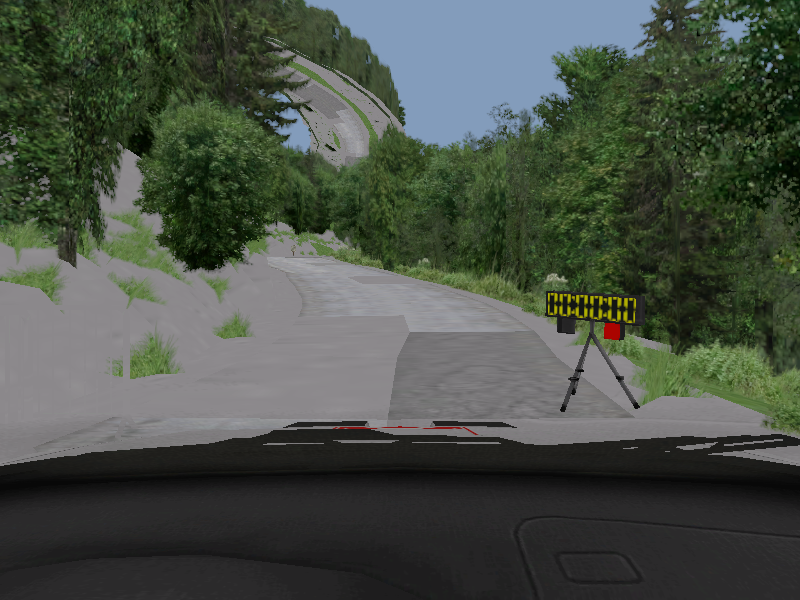
Existing stage geometry and textures are drawn alongside car geometry, using a recorded original camera.
What this shows: a real stage is loaded, textured and viewed from the car.
Still wrong: distant roadway, sky and some material colours. This is a recorded frame, not a completed interactive drive.
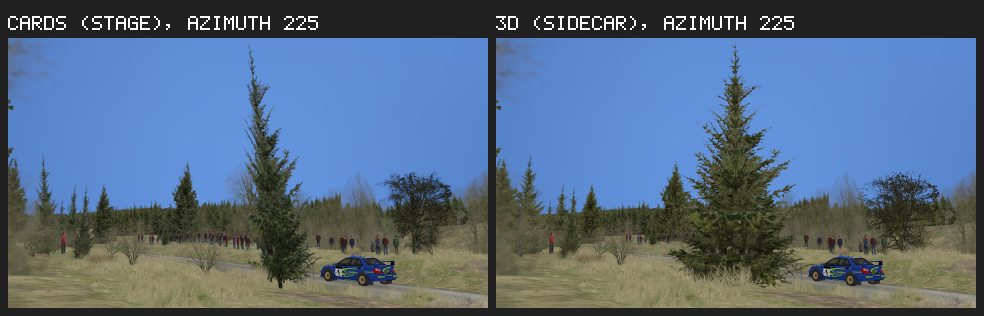
The same camera sees the original flat tree representation on the left and a replacement 3D tree from a sidecar on the right. Both are drawn by our renderer.
What this shows: visual assets can be extended without changing the native stage file.
This earlier experiment is separate from today's Bisanne package route. Native wind and visual/collision agreement remain unfinished.
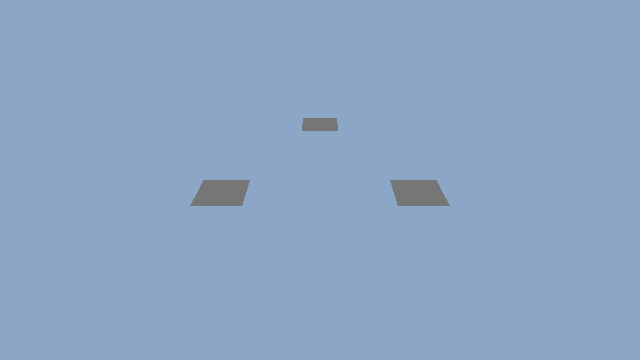

The same small scene is rendered without and with additional lights. The surfaces pick up the coloured light.
What this shows: optional point/spot lighting works through our graphics package route, with a usable base when it is disabled.
This is a functional test scene, not finished lighting on an RBR stage.
Original collision/driving data remains authoritative. We use targeted analysis of original RBR to discover interfaces; full byte-matching decompilation is not a prerequisite. NGP is not being reverse engineered or reimplemented. No plugin-author endorsement or universal plugin compatibility is implied.
The earlier plan explored a decompilation-led route through five phases. The current focus is the hybrid graphics replacement shown above.
Explore the archived presentation → Its phase map, plugin explorer and historical figures remain available. The decompilation dashboard is also preserved; it is not the completion percentage of this graphics project.